🗓️ Schedule
Schedule ("Scheduled execution") replays a cycle automatically: every night, every week, or after a transport. A scheduled run is replay-only: "only compiled cases are replayed, with no AI call and no data adaptation — zero cost and a stable verdict. Cases to compile or stale are skipped with their reason, never compiled without supervision."
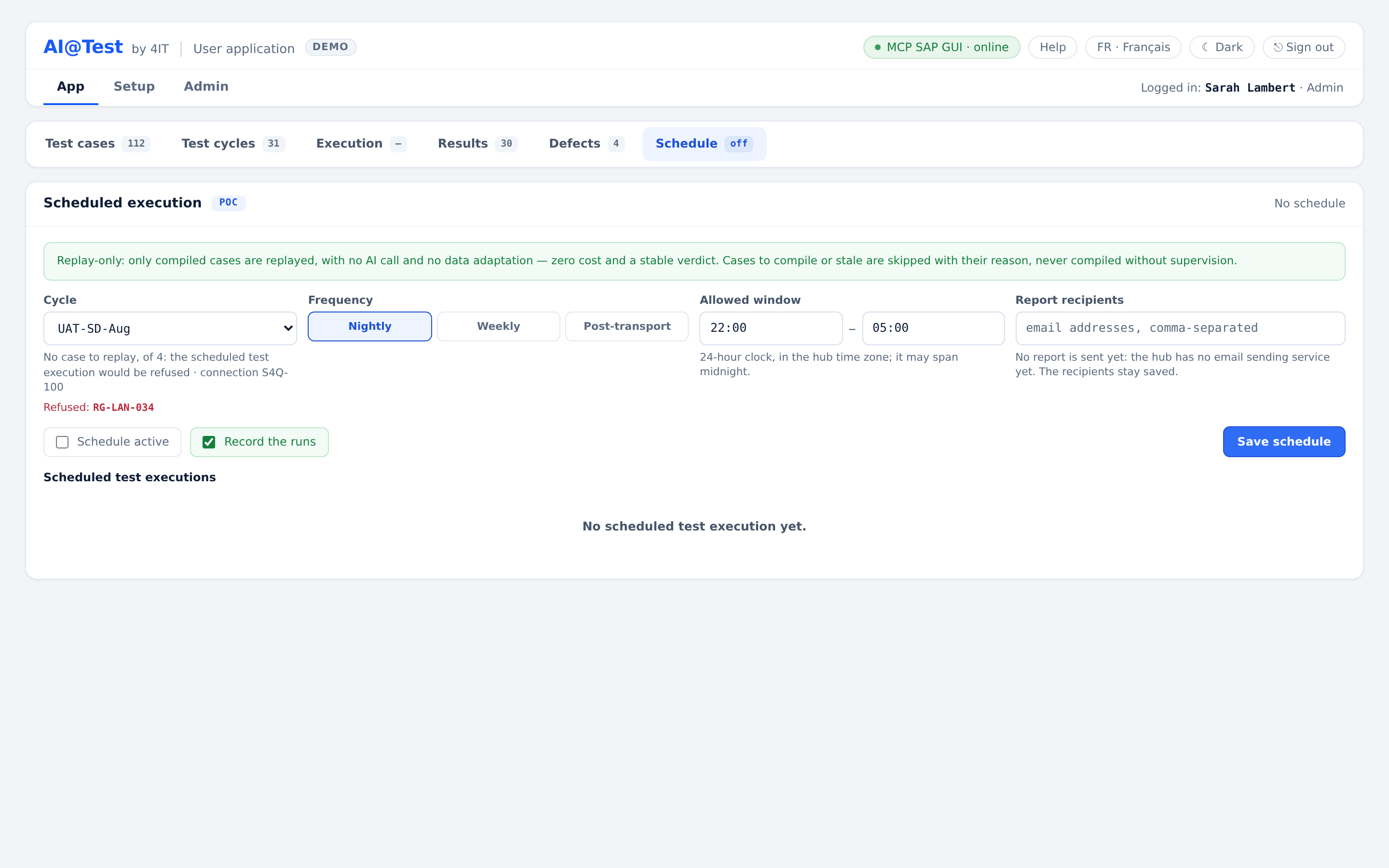
What a scheduled run does
- It replays the compiled cases of the cycle, in the order of the cycle, one run per ticked data row, applying the active Mapping. It targets the cycle's connection exactly as a run launched by hand does, with the connection's shared test account.
- It never compiles. Cases to compile, stale, compiled on another connection or in another language, archived or tagged @non-jouable are skipped, each with its reason.
- It never adapts data.
- It excludes the held cases (frozen on a SAP session to inspect), naming them.
- It records a screenshot at each step only if "Record the runs" is on; otherwise only the screen of a failure is captured.
- Its AI cost is zero.
- If the lane is busy, it waits in the queue like any launch.
A schedule never compiles. Run a new or changed case once by hand ("▷ Run case" or "▷ Run cycle" in Execution) so that it is compiled, then let the schedule replay it.
Set up a schedule
A cycle has at most one schedule. Admins and Testers set it up; the Auditor reads it.
- Open Schedule and choose the "Cycle". The screen shows its perimeter, for example "10 compiled cases to replay, of 12 · connection …". When no case can be replayed, it warns that the scheduled test execution would be refused.
- Choose the "Frequency": "Nightly", "Weekly" or "Post-transport".
- Set the "Allowed window": "Start" and "End", as hh:mm on a 24-hour clock, in the hub time zone. The window may span midnight (22:00 → 05:00); a start equal to the end allows the whole day.
- Set "Record the runs" on or off.
- Turn "Schedule active" on.
- Click "Save schedule". The screen confirms "Schedule of … saved."
A new schedule starts as Nightly, with the window 22:00 → 05:00, inactive, its runs recorded, and no recipient.
The line at the top sums up the schedule, for example "Nightly · cycle · replay-only · next test execution day hh:mm", "Schedule inactive" or "No schedule", with the last deadline.
Frequencies
| Frequency | When it runs |
|---|---|
| Nightly | Once per allowed window; a window that spans midnight counts as one night. |
| Weekly | Seven days after its last deadline, within the allowed window. |
| Post-transport | Never at a set time: the screen reads "on transport event". Start it with "Trigger now" once the transport is imported. |
A deadline is consumed even when its run is refused or cut: the schedule does not retry before its next window. If the hub was stopped for a whole window, that window is reported as missed.
Trigger now
"Trigger now" starts the scheduled run at once: "A replay-only run, without AI or data adaptation, that goes through the queue like any launch." It uses the saved schedule: if "Record the runs" has unsaved changes, save them first.
Read the report of the scheduled runs
The table "Scheduled test executions" is the report of the schedule, most recent first:
| Column | What it shows |
|---|---|
| Test execution | The EX-… number; it opens the test execution in Results, with all its runs and evidence. |
| Result | "12 cases · 10 passed · 1 failed · 1 other", and the pass rate. |
| Verdict | "Passed", "Failed" or "Blocked". |
| Duration | The duration of the test execution. |
| AI cost | Zero for a replay-only run. |
How to read the verdict:
- Failed: at least one case truly failed (a probative failure), or an incident occurred.
- Blocked: nothing failed, but something did not pass: a freeze, a refused target, a held case, a blocked run or row, or a non-probative or partial-proof result. Skipped cases do not block the verdict.
- Passed: at least one case was replayed and none is blocked.
A window without a test execution reads "No test execution", with its cause, such as "Missed: the hub was stopped for the whole window" or "Abandoned in the queue: hub restart". An infrastructure freeze is never reported as a regression.
The "Report recipients" field (email addresses, comma-separated) is set by an administrator. Today no report email is sent: "the hub has no email sending service yet. The recipients stay saved." Read the report in this table and in Results.
Schedules and cycle changes
- An archived cycle cannot be scheduled as active. To archive a scheduled cycle, deactivate its schedule first.
- To change the connection of a scheduled cycle, deactivate its active schedule first.
- After a connection change, the scheduled replay skips the cases to recompile until they have been recompiled on the new connection.
- Deactivating a schedule while its run is in progress lets that run finish, and removes its waiting runs from the queue.