🚀 Overview
Your SAP system just changed. Does your business still run?
Every SAP S/4HANA program reaches the same moment. After a data migration, a reconfiguration or a release upgrade, someone has to prove that sales orders, deliveries, invoices and goods movements still go through. Usually that means key users replaying the same flows by hand in SAP GUI, round after round, and gathering screenshots by hand as evidence. Test automation suites promise relief, but every test has to be built by hand first, a recorded flow breaks at the first screen change, and the tool often ends up in the hands of a single specialist. Pure AI agents don't solve regression testing either: you pay for them again on every run, and they may not behave the same way twice.
AI@Test changes how this works. You describe each test in plain business language. An AI agent runs it once, live, in your SAP test system, and learns it. After that, AI@Test replays it as often as you like, without AI, at zero token cost and with a stable verdict. Every step shows what was expected and what SAP returned, and a case that creates data has to prove it in the database.
Cases are described in plain text, screen recording, Excel files, chat etc. The agent learns them by running them once, and AI@Test then replays them at will, without AI.
What is AI@Test?
AI@Test by 4IT is an agent-driven functional testing product for SAP. It speeds up functional acceptance and regression testing for SAP S/4HANA projects (data migrations, reconfiguration, release upgrades) by splitting every test into two moments:
- Learn once, with AI. A test case is written in any format, transformed into the internally used Gherkin format. On its first run, the AI agent plays it live in SAP GUI and writes its trace, the exact sequence of SAP actions. This is the compilation. A trace only enters the catalog once it passes the bar: its form is checked, each Then must be proven, and two replays without AI must pass.
- Replay at will, without AI. Every later run replays the trace. No AI and no tokens, so replays are free and give a stable verdict. If a case's content or its connection changes, the case becomes Stale and its next run recompiles it. If a SAP screen changes, "Recompile" runs the compilation again.
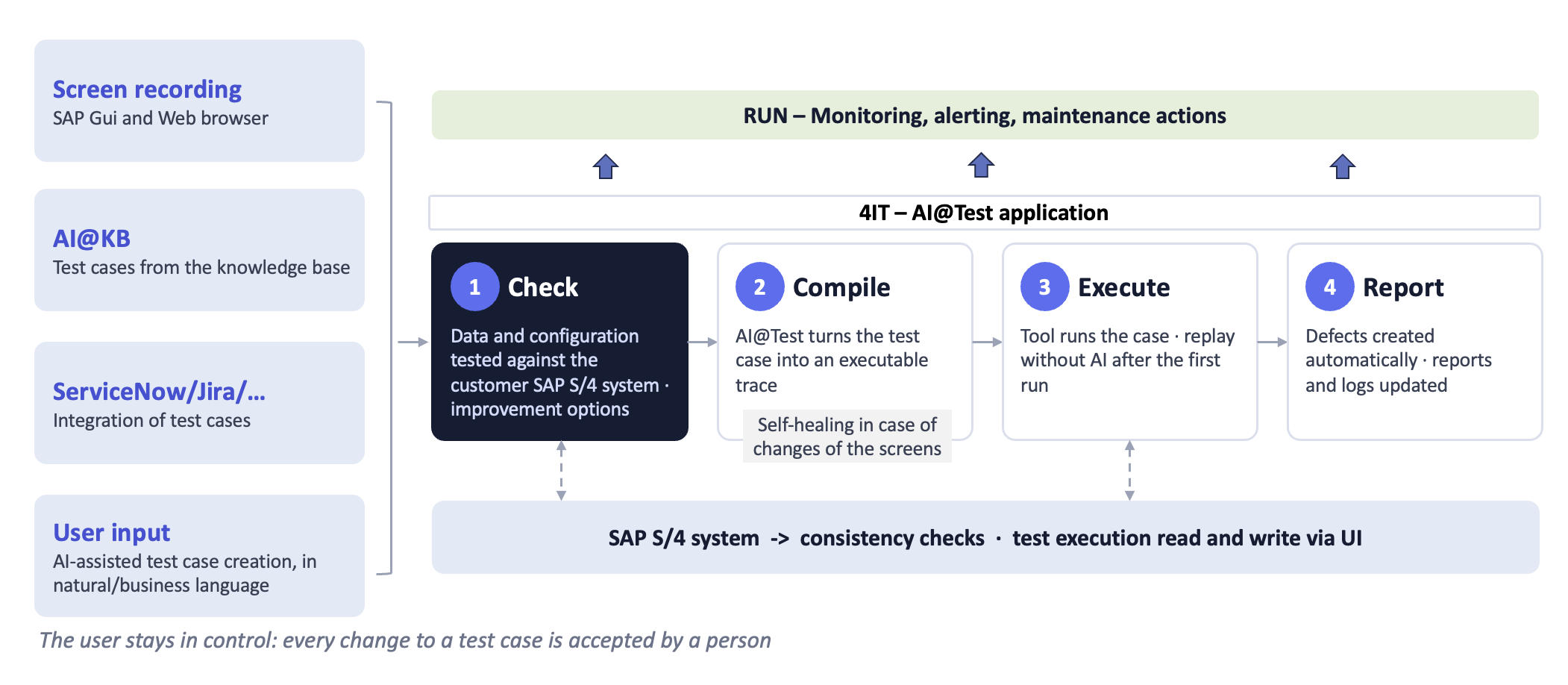
Once imported or recorded, a test case can also generate a complete user guide. See here a complete example (PDF).
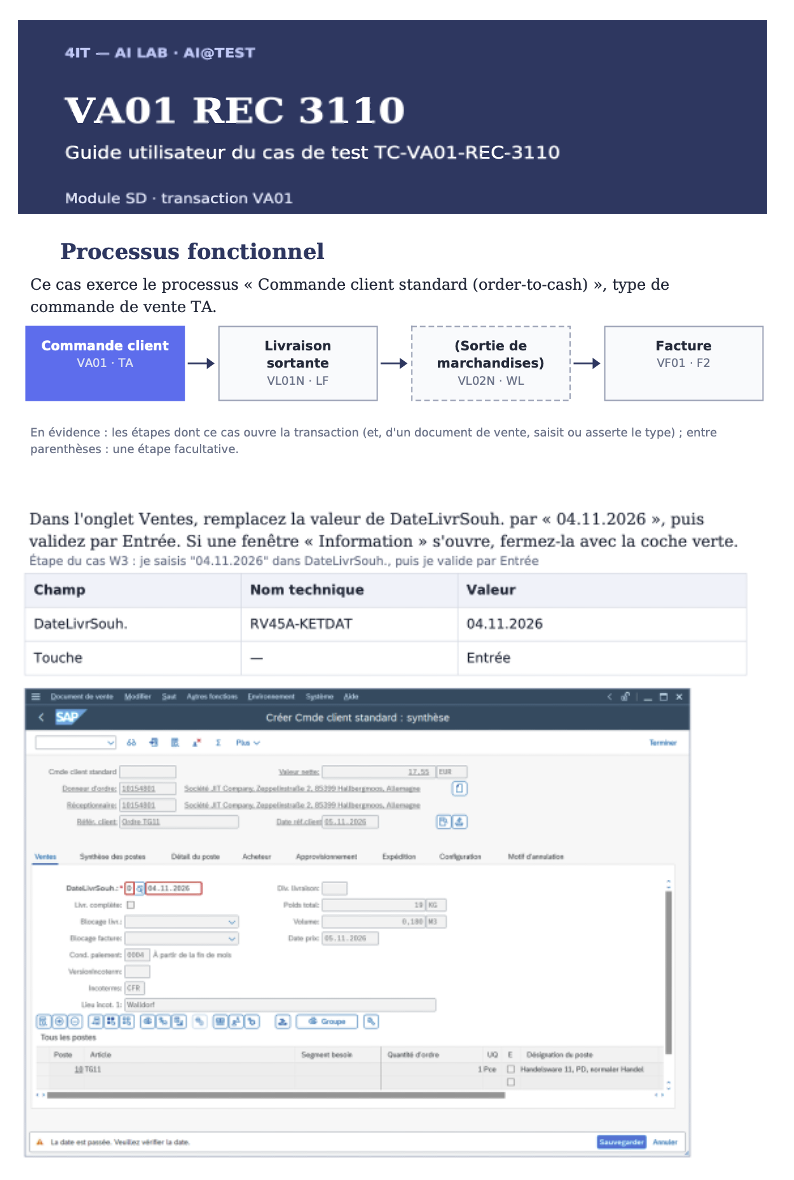
Example of a generated user guide (French): the functional process of the case, then each step with its fields, values and SAP screenshot. Click it to open the complete English example as a PDF.
Automation suites built by hand give you replay without the learning. Pure AI agents give you learning without cheap, stable replay. AI@Test gives you both.
AI@Test drives SAP ECC and SAP S/4HANA through the classic SAP GUI and any Web technology based application (Fiori, Salesforce, Kinaxis, etc.). Runs go through a Windows execution agent, which drives one SAP session at a time. AI@Test is built for test systems: it refuses any system classified as Production. Users sign in with their organization's Microsoft account (Entra ID), and AI@Test never asks them for a password. An administrator sets up the SAP test accounts the agent uses, and their secrets are never shown again. The interface is available in English and French, and cases can be written in either language.
AI@Test uses a small, precise vocabulary:
| Term | Meaning |
|---|---|
| Test case | What a test checks: a title, preconditions, and Given, When, Then steps. |
| Test cycle | An ordered list of cases, tied to a Connection, that run together. |
| Connection | The exact SAP system the runs reach: host, instance, client and language. |
| Test account | The SAP account the execution agent opens its session with. Its secret is never shown again. |
| Test execution | One dated launch of a cycle, numbered EX-…. It freezes the cycle's Connection and cases and groups their runs. |
| Test run (run) | One case played in a test execution, with its verdict, log and screenshots. |
| Trace | The sequence of SAP actions that a compiled case replays without AI. |
| Defect | A deviation reported by SAP during a run. It is tracked until someone closes it, and retested on the case where it was found. |
How It Works
From a Test file to a nightly regression replay, in five steps.
Step 1 — Describe or record
Everything starts from a Test case. It describes what the test checks in Given, When, Then steps that any business user can read, for example Given the customer "<customer>", When I create the order in VA01, Then the order is saved.
There are two ways to bring cases into AI@Test:
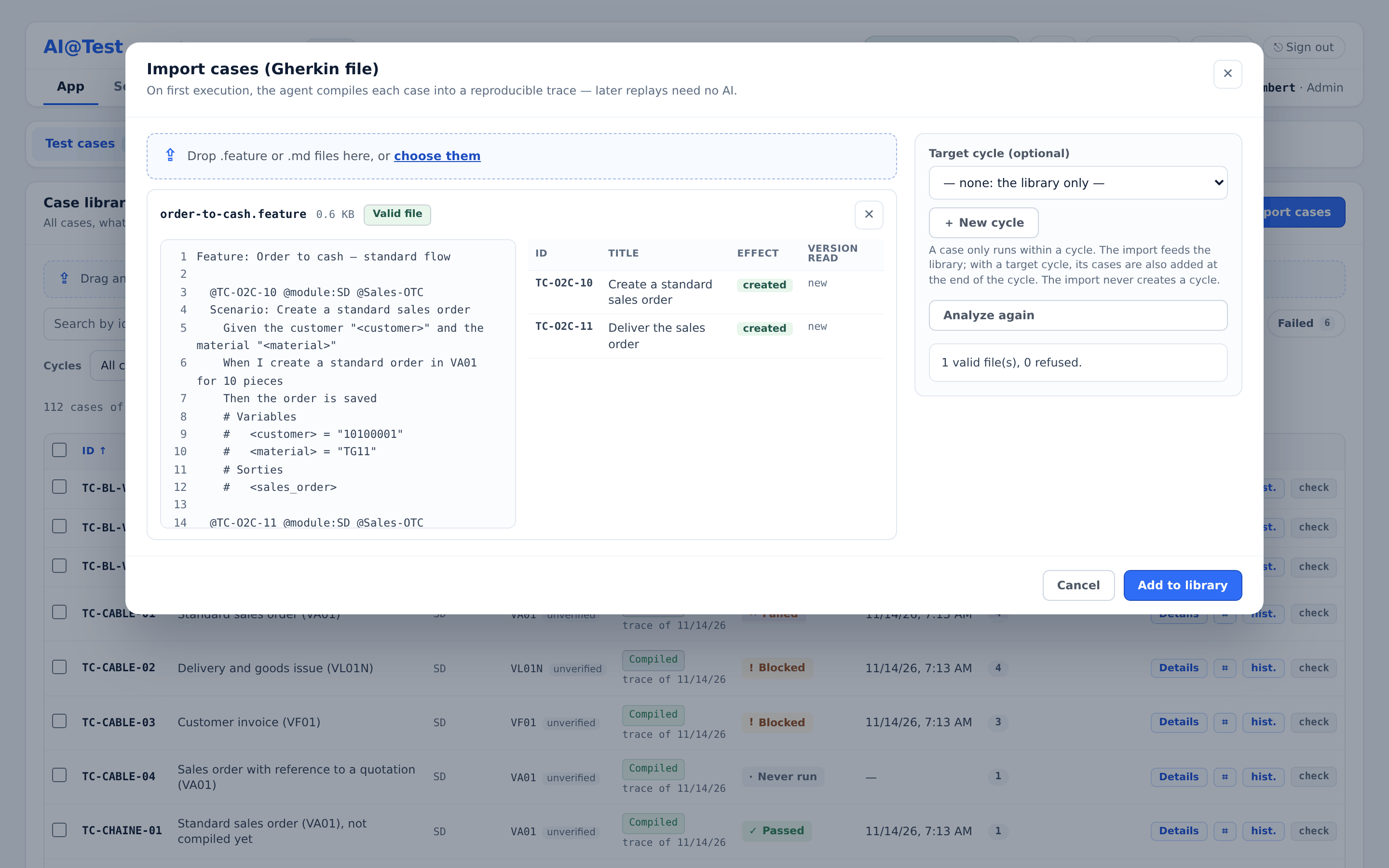
- Import Test files. In "Test cases", click "+ Import cases" and drop one or more
.featureor.mdfiles, in English or French (up to 50 files per drop, 1 MB each). You can write the files yourself or produce them with any tool you like. Click "Analyze" to see, before anything is written, what the import will do with each case: created, updated or unchanged. A refused file writes nothing, and each refusal names its line and says how to fix it. Values that change from one run to the next are written like<customer>and declared in a "# Variables" block at the end of the case. - Record in SAP GUI. When your instance offers recording, an administrator declares your recording station. Click "Record in SAP GUI", choose the station, the Connection and your SAP GUI window, then click "Start recording". Work in SAP GUI under your own SAP account: AI@Test captures your actions and turns them, without AI, into the case's steps and a recorded trace. In the "Complete" phase, you write the Thens (AI@Test proposes some, without AI, from the success message of the last save and from the fields SAP displayed). You declare each date typed during the recording as "today's date", "a rule" or "a fixed date", and you choose the case's nature: "Read only", "Creates data" (the case then adds the table read that proves what it creates) or "Presumed to write". "Import" brings in the Gherkin together with its recorded trace. "Import to compile" brings in the Gherkin alone, which the agent will compile; the Gherkin, typed values included, then goes to the AI model.
Whether it comes from a file or from a recording, an imported case enters the library "To compile".
Step 2 — Compose a test cycle on a Connection
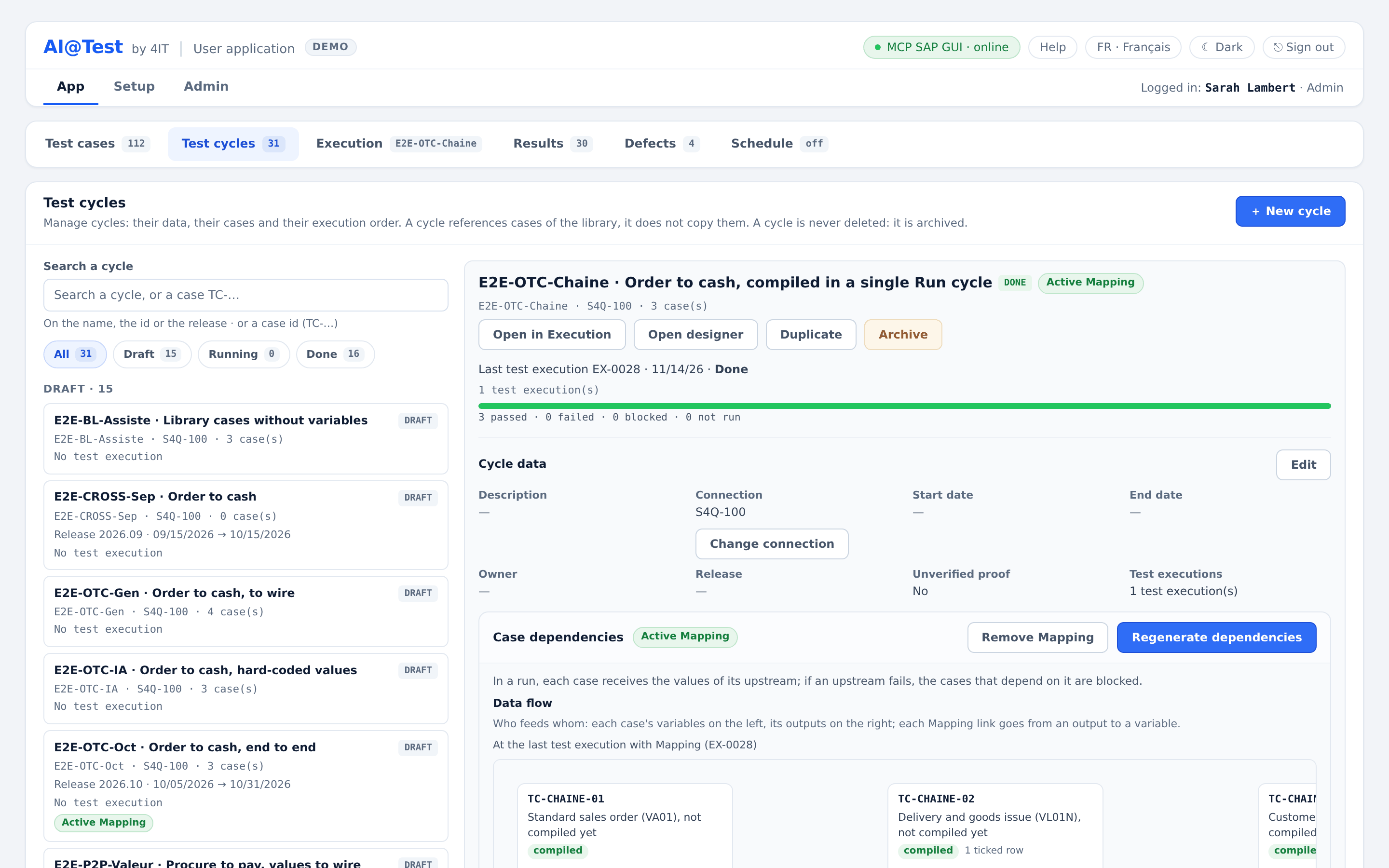
A case only runs as part of a Test cycle: an ordered list of cases tied to a Connection, the SAP system its runs reach.
- Create the cycle. In "Test cycles", click "+ New cycle" and give it a name and a Connection. Add cases with "+ Add cases", or tick them in the case library. A cycle references cases rather than copying them, so one case can belong to several cycles. Drag cases to set the execution order.
- Vary the data. For a case with variables, you enter rows of test data in Details › Test data. Each row you tick in the cycle produces one run. With "Fetch test data", the agent searches the system, read-only, for values that exist there, linked together when a table links them (customer and sales organization, material and plant). It proposes them as rows that you keep or discard. "Check rows" checks your rows against the system before you save them, provided the Connection can be read.
- Chain cases. A case can pass a value it creates, such as an order number, to later cases in the cycle. Declare that output in a "# Sorties" block, click "Generate dependencies", review each proposed link, then click "Save Mapping". "Open designer" shows the cycle's cases and their links on a canvas, where you can also add cases and links.
- Check before you compile. For order-to-cash (SD) cases, the "Consistency check" reads SAP, without writing anything, to confirm that the data and configuration the case relies on exist on the Connection. The AI agent runs it, so it counts toward the instance's AI spending caps.
Step 3 — The agent compiles the case at its first run
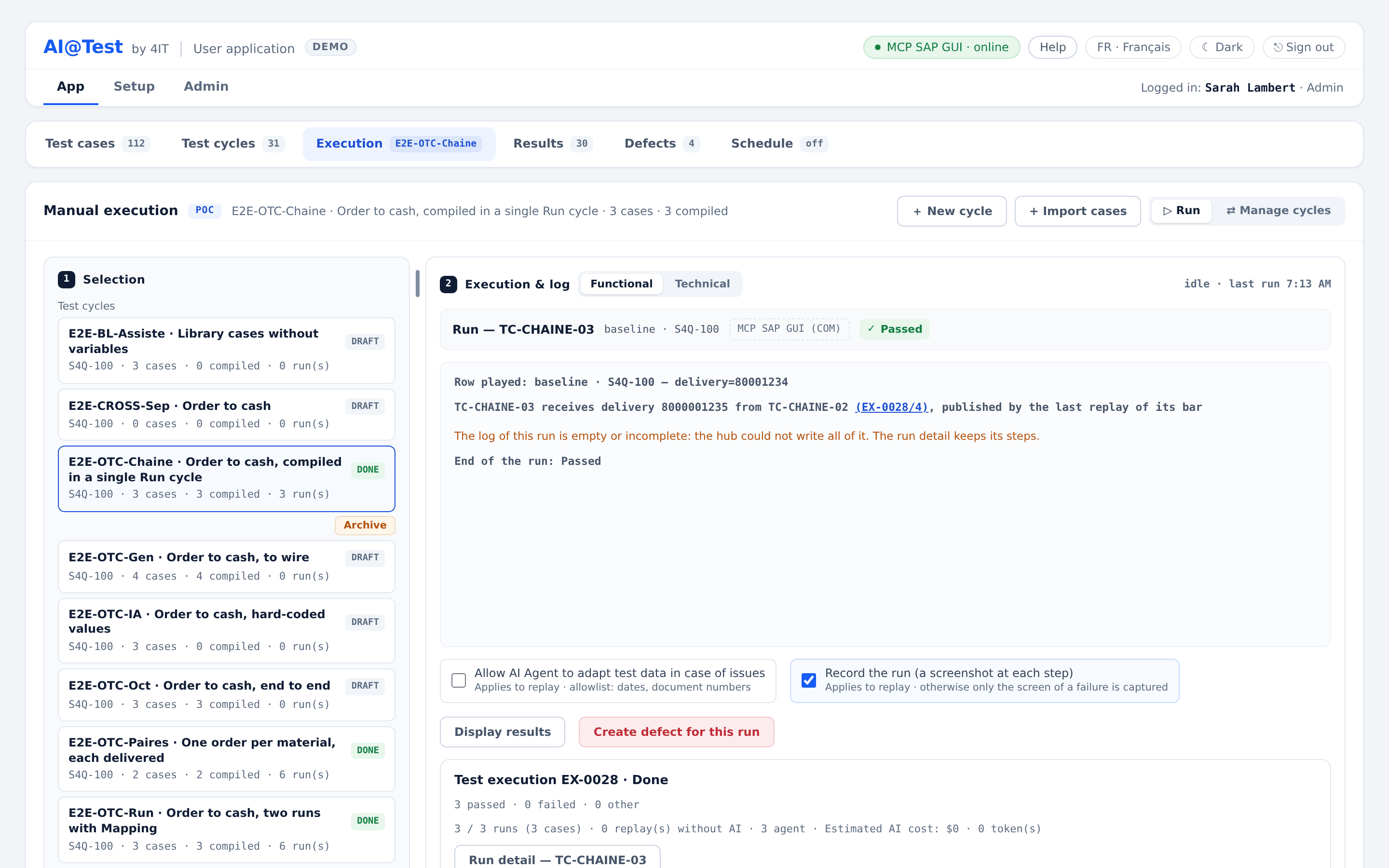
In "Execution", choose the cycle, then click "▷ Run case" or "▷ Run cycle". Before you click, the screen tells you whether each case will be compiled by the AI agent or replayed. A compilation costs money: running a single case that needs compiling, or recompiling one, asks you to confirm first, and "▷ Run cycle" says how many of its cases the AI agent will play.
A case that is "To compile" or "Stale" is first played by the AI agent. The agent reads the Gherkin, drives SAP GUI on the Connection, reads what SAP answers at each step, and writes the trace. The trace then has to pass the bar: its form is checked, each Then must be proven, and two replays without AI must pass. Only then is the case marked "Compiled". If the agent cannot get there, it says so ("compilation impossible, declared by the agent") instead of promoting a doubtful trace.
You follow everything live in the log. Costs are visible: every compilation counts toward the instance's daily and monthly LLM spending caps, and every test execution shows its "Estimated AI cost". Only one run drives SAP at a time; the others wait in the queue.
Step 4 — Replay at will, without AI, with database proof
After compilation, every run of the case replays its trace, and the mode shows "replay (0 tokens)". No AI is called, so a replay costs nothing, can be repeated as often as you need, and gives a stable verdict.
- Database proof. A case that creates data has to prove it. Its trace includes a database read that confirms the record the run created is present. The run detail shows this as "Database proof · at least 1 row in …". A success message on the screen is not enough.
- Perishable values. If you tick "Allow AI Agent to adapt test data in case of issues" when you launch, a replay can re-link a date or a document number from a closed allow list before it plays: a posting date to the period actually open, a document number to one captured by an earlier step of the same trace, never an invented value. The adaptation itself follows fixed rules and calls no AI. Each adapted step shows as "Recovered", and the adaptation never touches a Then.
- When things change. If you edit a case's Gherkin or change its Connection, the case becomes "Stale · recompile" and its next run recompiles it. If a SAP screen changes, "Recompile" has the agent learn the case again.
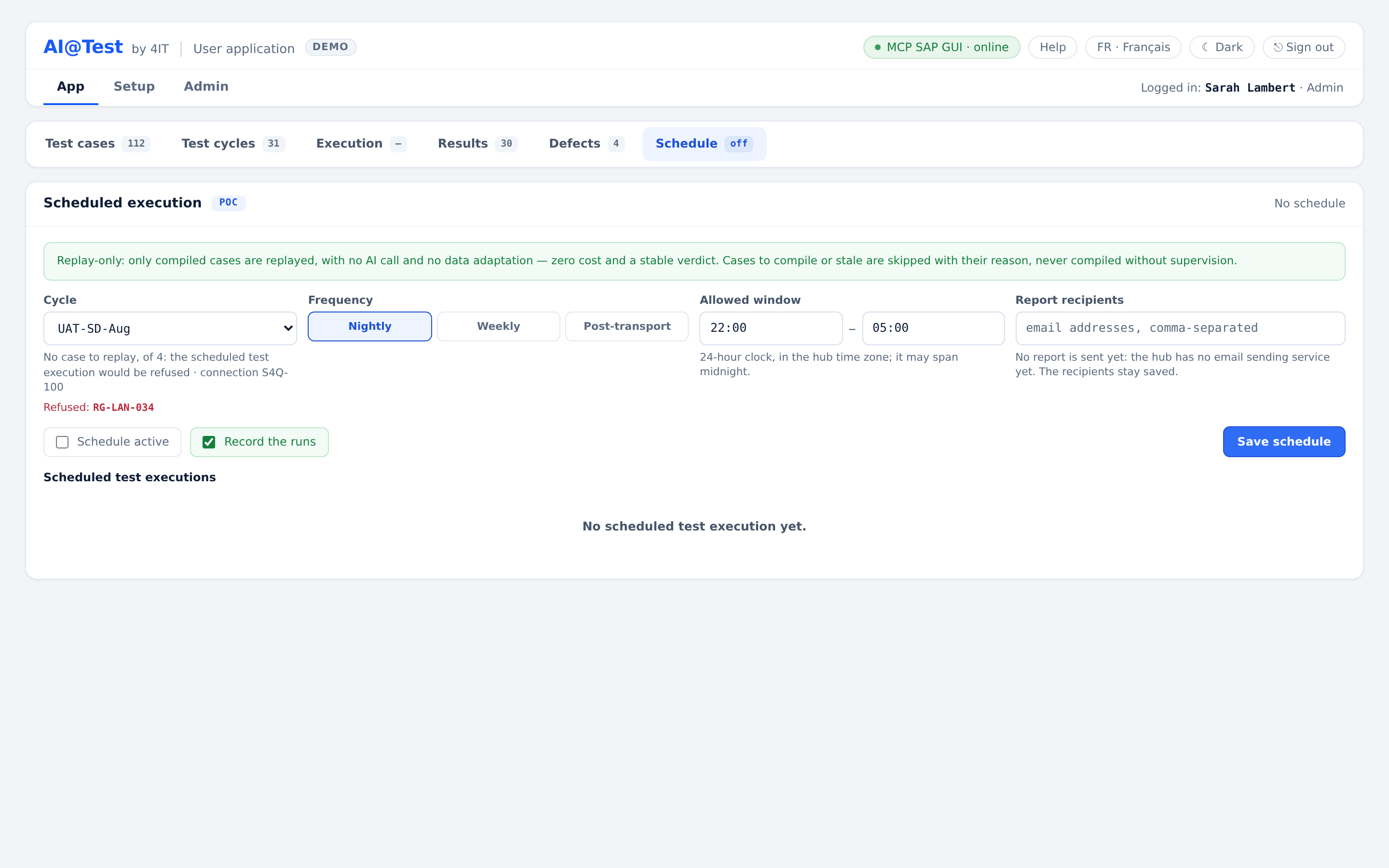
- Schedule. In "Schedule", a cycle can replay "Nightly" or "Weekly", within an "Allowed window". A "Post-transport" schedule does not start on its own yet: it starts when someone clicks "Trigger now", which also launches any schedule on demand. Scheduled runs are replay-only: only compiled cases run, with no AI call and no data adaptation, so they cost nothing. A case that is to compile or stale is skipped, with its reason. It is never compiled without supervision.
A cycle can be explicitly set to "Unverified proof". In that case only the screen is judged: no database proof is required or played, and every run of the cycle is marked "Unverified proof".
Step 5 — Results, evidence and defects
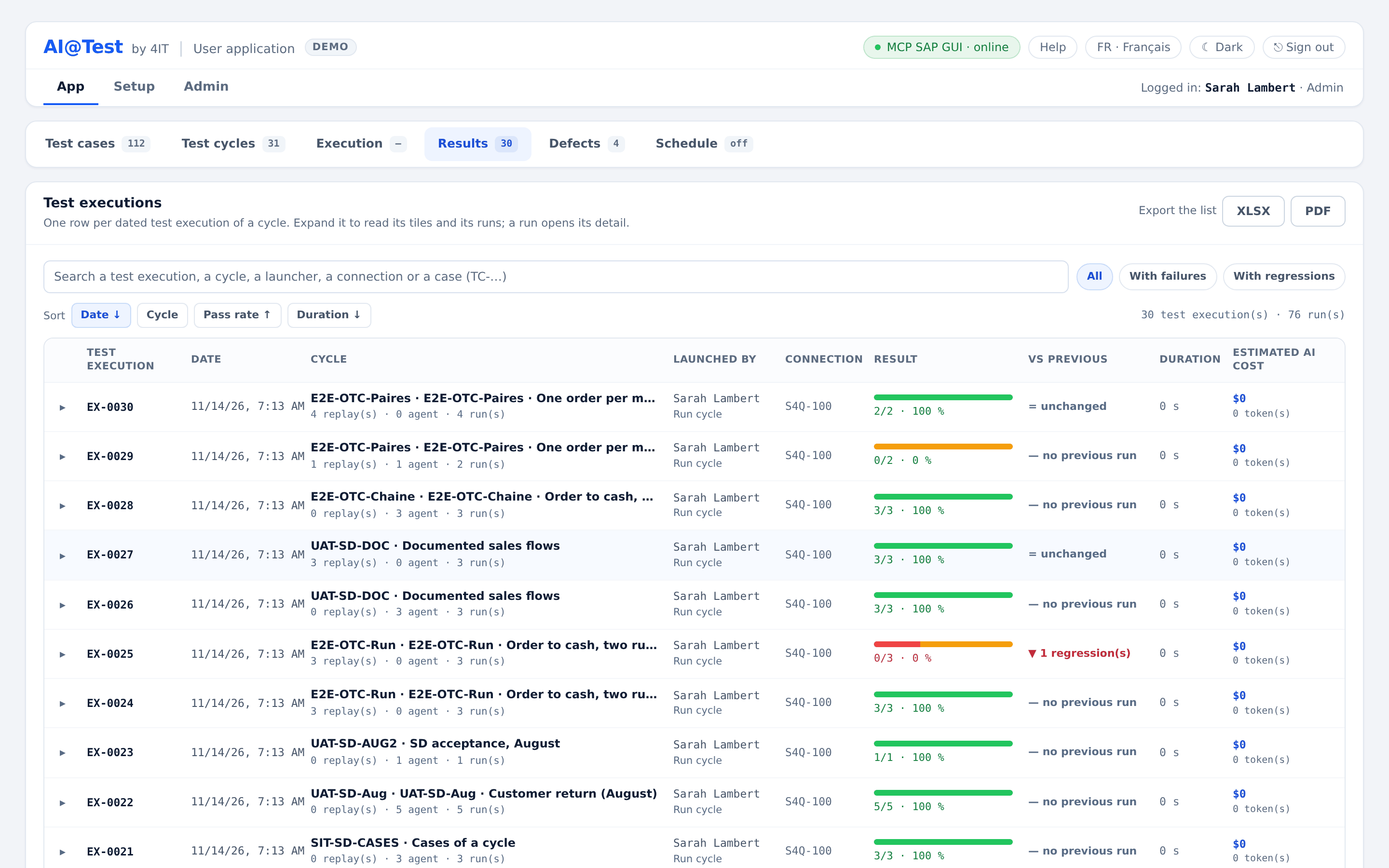
Every launch becomes a dated Test execution that freezes its Connection and cases and groups their runs.
- Read each run. Double-click a case in "Execution" to open its last run. For each step you see what was expected and what SAP actually returned ("Expected" and "Actual"), and the SAP status bar. When the run is recorded ("Record the run"), each step also has its screenshot; otherwise, the screen of a failure is captured.
- Results keeps every test execution, newest first, with its pass rate, duration and estimated AI cost. "vs previous" flags regressions (▼, passed to failed) and fixes (▲). You can export a test execution as XLSX or PDF.
- Honest verdicts. A "Passed" run played all its steps without deviation. If one of its Thens is not anchored by a reliable reading of SAP, the run reads "Passed · x/y Then anchored" and is counted separately, never with the passed runs. A result that no longer proves anything about the case as it is today is marked "Non-probative". When the infrastructure fails, the test execution stops as "Frozen (INFRA)" and nothing is held against the cases.
- Defects come from failures. When SAP reports a deviation, a defect opens; you can also create one by hand from a run with "Create defect for this run". A defect carries the exact SAP finding, the case, the run and the step. A case has only one open defect per SAP message key; when the same finding comes back, it is added to that defect. You can edit the defect's summary, severity, nature, description, instructions, expected and actual results. "Retest" reruns the case where the defect was found, and "Close" closes the defect. A green run never closes a defect on its own: only a person closes it.
Key Benefits
| Benefit | What it means |
|---|---|
| Tests in business language | Cases are written in Gherkin (Given, When, Then), in English or French, so key users can read them, not only specialists. |
| No automation to build by hand | You import your Gherkin files or record the case in SAP GUI. The AI agent learns the case by running it. |
| Zero AI cost on replay | After compilation, every replay runs without AI: 0 tokens and a stable verdict, as often as you need. |
| AI spending under control | Each compilation is announced before it starts and counted in its test execution's estimated AI cost. Daily and monthly caps protect the instance, and replays are never refused. |
| Proof, not just green | AI@Test tells, for each Then, whether a reliable reading of SAP anchors it: a message key, a field value or a database read. A case that creates data proves it in the database, and a passed run whose Thens are not all anchored reads "Passed · x/y Then anchored" and is counted apart. |
| Evidence at every step | Each step shows what was expected and what SAP returned, with the status bar; a recorded run adds a screenshot of each step. You can export to XLSX, PDF or CSV, and the audit trail records every action. |
| Data-driven and chained | Variables and test data rows turn one case into many runs. "Fetch test data" finds valid values in SAP, and the Mapping passes a created document on to the next case. |
| Regression on autopilot | A whole cycle can replay nightly or weekly, in replay-only mode, without AI and at no cost. A post-transport replay starts with "Trigger now". |
| Defects with context | Defects come from SAP findings, are grouped per case and finding, can be requalified as "Configuration" or "Data issue", and are retested on the case where they were found. |
| Safe by design | Production systems are refused. Users sign in with Microsoft Entra ID. Test account secrets are encrypted and never shown again, and the Auditor role reads everything but writes nothing. |
| User guides from your tests | For a compiled case, "Generate the user guide" produces a PDF guide in English or French from the case's Gherkin, test data, trace and screenshots. The guide is written by AI, its cost is shown, and you review it before storing it. |
The Screens
| Page | What you do there |
|---|---|
| Execution | Choose a cycle and see the state of each case ("To compile", "Compiled", "Stale"). Click "▷ Run case" or "▷ Run cycle", follow the live log, "Re-run the failed cases", and double-click a case to open its last run. |
| Test cases | The case library. Import cases ("+ Import cases") or "Record in SAP GUI", search by id, title, module or transaction, and filter by state, cycle, module or tag. In Details, you read and edit the Gherkin (Text and Gherkin views), enter test data, run the Consistency check and generate the user guide. |
| Test cycles | Create cycles ("+ New cycle"), add and order cases, tick data rows, "Fetch test data", "Check rows", build the Mapping, "Open designer", and archive or restore cycles. |
| Results | Every test execution, newest first, with its summary tiles, its runs and "vs previous". Filter by "With failures" or "With regressions", and export as XLSX or PDF. |
| Defects | Open and closed defects with their severity, SAP message, origin and nature. Edit, requalify, "Retest", "Close", "Reopen" and "Export CSV". |
| Schedule | Replay a cycle nightly or weekly within an "Allowed window", start a schedule with "Trigger now" (the way a post-transport replay starts), and see the history of scheduled test executions. |
| Setup | Tags (with color and description) and modules that classify the cases. |
| Admin | Connections (with their connection test), Test accounts, Recording stations, Users and their roles, Archive and Audit, plus the Platform and Instance LLM spending cards. |
| Help | A guide for each role, "Write an importable case", the glossary and the support contact. |
Who Uses It
AI@Test has three roles: Admin, Tester and Auditor. An administrator assigns each user's role in Admin › Users, and users sign in with Microsoft Entra ID.
| Who | AI@Test role | What they do |
|---|---|---|
| Tooling or SAP Basis administrator | Admin | Declares the Connections to SAP test systems, the test accounts, the recording stations and the users. Watches the execution agents and the LLM spending, and archives or restores cycles and cases. An Admin can also do everything a Tester does. |
| Test manager | Tester (or Admin) | Organizes test rounds into cycles, chooses the data rows, runs cycles, schedules nightly or weekly replays, triggers post-transport replays and follows defects until they are closed. |
| Functional consultant or key user | Tester | Writes or records cases in business language, reads each run step by step, and qualifies defects as "Configuration" or "Data issue". |
| Project or program manager | Auditor | Follows pass rates and regressions in Results, and exports test executions as XLSX or PDF. |
| Quality assurance or internal audit | Auditor | Reads everything and writes nothing: results, runs and their evidence, defects and the audit trail, all exportable. |
- Creating a single case from a chat inside AI@Test. Today, cases are imported from Gherkin files or recorded in SAP GUI.
- Validating a recorded trace at the case's first run without calling the AI agent. Today, a recorded case's first run is compiled by the agent, like any case "To compile".
- Starting a "Post-transport" schedule automatically when a transport arrives. Today, it starts with "Trigger now".
- Web applications. A web connector and the recording of web cases are being built. Today, only the SAP GUI connector is active.
Ready to try it on your own SAP system? Go to Getting Started to sign in and run your first test cycle.