🖥️ Application
The AI@Test application is organized into three main sections, accessible from the top navigation bar: Test Manager, Test Case Generation, and Monitor.
Test Manager
The Test Manager is the central control panel for organizing and executing automated test scenarios.
Test Case Selection
The left panel displays your test case library. Test cases can be:
- Filtered by module, process area, or custom tag
- Grouped into test scenarios — ordered collections of test cases that represent an end-to-end business process
- Assigned a priority and a target SAP system
Drag and drop to reorder test cases within a scenario, or use the + Add button to include additional cases from the library.
Execution Options
Once a scenario is assembled, configure how it should run:
| Option | Description |
|---|---|
| Execution frequency | One-time run, daily, weekly, or custom schedule with an end date |
| Iteration sequence | Define how many times each test case runs and in what order |
| Test interface | SAP GUI Desktop, SAP Fiori, or both (for cross-channel scenarios) |
Test Data
For each scenario, define the source of test data:
| Source | Description |
|---|---|
| AI-generated | The AI agent creates realistic, coherent test data for each field automatically |
| Live system data | The agent reads existing documents from the SAP system and uses them as input |
| Test repository | Import from your existing test data repository via API |
| File upload | Load test data from an Excel, CSV, or JSON file |
Logging & Reporting
Configure what is captured during execution:
| Output | Options |
|---|---|
| Email notification | Send a summary email on completion (pass/fail counts, link to full report) |
| Log file | Plain-text execution log saved to a configured path |
| JSON export | Structured result file compatible with test management tool APIs |
| Test evidence | Enable screenshot capture at each step for audit and sign-off documentation |
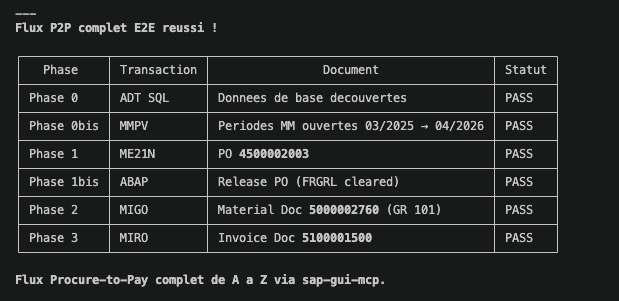
Here is a test evidence of the execution of an AI automated test script:
Defect Creation
When a test step fails and cannot be self-healed, AI@Test can automatically create a defect:
| Target | Details |
|---|---|
| Jira Xray | Push defect with screenshot, error message, and test case reference via Jira REST API |
| qTest | Create test run defect in qTest with full execution context |
| JSON export | Export defect data as JSON for integration with other tools |
Test Case Generation
The Test Case Generation section allows users to define new test cases in plain language — no scripting knowledge required.
Natural Language Input
Type a description of the test scenario you want to automate:
"Create a test case to validate the SAP SD return order flow: customer raises a return request, a return sales order is created in VA01 with document type RE, the return delivery is processed in VL01N, and a credit memo is issued in VF01."
AI@Test interprets the description, identifies the transactions and steps involved, and generates a fully structured, executable test script. The generated script is displayed for review before saving.
AI@KB Knowledge Base Integration
When an AI@KB report is available for your target SAP system, AI@Test can use it to generate test cases grounded in your actual system configuration.
Select a report from the dropdown:
AI@KB knowledge base existing reports: SAP S/4 QUA system — Documentation report March 2026
When an AI@KB report is selected, the agent retrieves the actual document types, delivery types, pricing conditions, and process variants configured in your system. The generated test script reflects your specific configuration — not a generic SAP template.
🔍 CLICK TO ENLARGE — Test Case Generation with AI@KB integration
Create a test case to validate the SAP SD return order flow: customer raises a return request, return sales order created in VA01 with document type RE, return delivery processed in VL01N, credit memo issued in VF01.
This integration is particularly valuable at the start of a project or before a major system change: in minutes, you have a complete, system-accurate test suite without any manual scripting.
Generated Test Case Structure
Each generated test case includes:
| Element | Description |
|---|---|
| Steps | Ordered list of transactions, screens, and actions |
| Fields | Field names and expected values at each step |
| Assertions | Success criteria — status bar message, document number created, field value |
| Data requirements | What test data is needed and how it should be sourced |
| Rollback | Optional cleanup steps to reset the system after the test |
Generated test cases are saved to your test library and are immediately available in the Test Manager.
Monitor
The Monitor section gives a real-time and historical view of test scenario executions across your organization.
Execution Dashboard
The dashboard shows:
- All test scenarios configured for your entity
- Last execution date and time
- Pass / Warning / Fail count per scenario
- Trend over recent runs (last 7 runs displayed as a mini sparkline)
Click on any scenario to expand the test case detail view: each test case within the scenario is listed with its individual status for the selected run.
Execution Detail
Selecting a specific test case execution opens the detail panel:
| Field | Content |
|---|---|
| Status | Pass / Fail / Skipped / Self-healed |
| Steps executed | Each step with its action, the SAP response received, and outcome |
| Errors encountered | Any error message read from SAP, with the correction applied if self-healing succeeded |
| Screenshots | Thumbnail gallery of captured evidence screenshots |
| Duration | Execution time per step and total |
Report Generation
Select one or more test scenario executions and click Generate Report to produce a professional PDF document.
The generated report includes:
- Executive summary with pass/fail statistics
- Per-scenario and per-test-case breakdown
- Error analysis — what failed, what was self-healed, what requires manual review
- AI-generated recommendations for each defect or recurring failure pattern
- Full screenshot evidence appendix
The report is delivered by email or saved to a configured output path, and is ready for use in test sign-off, audit reviews, or sprint retrospectives.